Detail Mini Oscilloscope HandHeld
Mini Oscilloscope HandHeld
K-125
Handheld digital scopemeter
E-SUN
K-125 Series handheld scopemeter is a portable tool for the measurement of waveform.Contrast with analog oscilloscope or desktop digital oscilloscope and digital multimeter, it is one best tool for observation in the field of teaching or in field use.
It uses a high speed AD to convert the input signal into digital signal , and display the signal on a 128* 64 lcd by a high speed CPU;
Using a high speed comparator to get a good edge trigger for a steady display , which is good for observation;
The multimeter part is using a dedicated chip wich is 6000 count and with a high precision;
It equiped with a large capacity lithium battery, which is to provided a 10 hours using when it is fully charged.
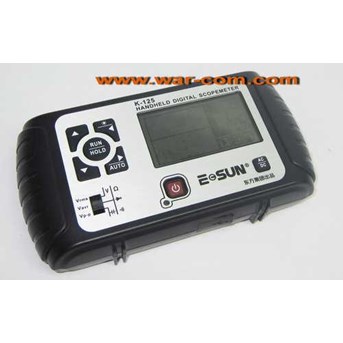
Control panel----The keyboard is on the left, the lcd is on the right, the power on / power off and switch is on the bottom, as shown in Figure 2
Notices:
1 Make sense of the instructing contents in this Instruction correctly;
2 when it is charging, do not use multimeter or connect with other circut by the black probe of multimeter;
3 The 1200mAH lithium polymer battery built in the Scope meter shall use the built-in dedicated charger rather than any other charger or DC source adapter to avoid the occurrence of hazard.
4 Please pay attention to the range of input voltage so as to prevent from the damage of instrument.
5 Never set the Scopemeter in an unstable stand or table to avoid of a falling down and subsequently resulting in the damage of products.
6 Never set the Scope meter nearby the hot body to prevent from damage of instrument due to superheating.
7 The liquid substance is forbidden to flow into the Scope meter.
8 Never set the Scopemeter under a heavy load.
9 Never use the liquid or gas detergent, but a dry cloth for cleanness is available.
10 Make sure of it is fully charged before a long time in storage, turn off the host machine you can charge it
K-125 with cross-grip design is easy for operation even using one hand , the appearance of it is concise generous; as shown in Figure 1.
Keyboard
1 left( ) / Backlight: to switch between different key, press and hold the key can switch between the status of on or off of baclight ( it changed until the key is released)
2¡ ¢ up( ¡ ø ) : to change the setting of current function object
3¡ ¢ down( ¨ ? ) : to change the setting of current function object
4¡ ¢ RUN/ HOLD: set the status of host machine to RUN or HOLD
5¡ ¢ Right ( ) / Auto: to switch between different key, press and hold it is to change the voltage base and time base of the host machine ( namely call the " AUTO" Function)
6¡ ¢ Power on/ off: power on / power off
7¡ ¢ AC / DC: To change the " Couple" of input signal, the status is displayed on the right side of bottom
8¡ ¢ Option switch: multimeter: V----to mesure the voltage
R----to measure the resistance/ diode/ ON-OFF
C----to measure the capcitor
scopemeter: Vrms----to get the RMS( Root-Mean-Square) value of voltage
Vavr----to get the average value of voltage
Vp-p----to get P-p( peak-peak) value of voltage
9¡ ¢ Battery charging: the red light is on when it is charging, the light will off until it is charged up
Waveform area:
1. Waveform: Show the waveform
2. Trigger line: A horizontal line of dashes indicate the position of trigger level
3. Grid: horizontal lines and vertical lines form a grid; to indicate the level of voltage and time base
Status area
The selected fuction is changed by pressing the Left key( backlight) or Right key( auto) , then the status area show the selected fucntion icon white against black; press the up key / down key is to change the setting of selected function. the detailed is as below:
4.scopemeter function: the current function of scopemeter, press up( ¡ ø ) or down ( ¨ ? ) to switch between scopemeter and multimeter.
5.trigger type: Rising edge/ falling edge/ none, press up( ¡ ø ) or down ( ¨ ? ) to change the type.
6.trigger level: the position of trigger level, press up( ¡ ø ) or down ( ¨ ? ) to change the position.
7.amplitude range: the range of voltage( value for each grid in vertical) , press up( ¡ ø ) / down ( ¨ ? ) to increase/ decrease
Result area:
1.result: consist of result and unit;
2.visual result analog bar: like progress bar ( or analog multimeter) , to view intuitively;
3.multimeter icon: means the current function is multimeter. press " up" ( ¡ ø ) or " down" ( ¨ ? ) to change between multimeter and scopemeter;
4.resistance/ diode/ ON-OFF: press " Left" ( ) or " Right" ( ) to select the icon. press " up" ( ¡ ø ) or " down" ( ¨ ? ) to switch among them. the icon will dispear if move to the position " V" and " C" ;
5.measure object: voltage( V DC/ C AC) , resistance( © ) , diode, ON-OFF;
6.RUN/ HOLD Status: RUN/ HOLD is same as scopemeter;
7.Couple: AC/ DC when measure the voltage it shows , it is same as scopemeter;
8.capacity of battery: is same as scopemeter.
Specification:
Bandwidth£ ¨ -3dB£ © : 25MHz
Sample: Max sample£ º 100MSa/ S
Channel: 1
Couple: AC, DC
Rising time: 2V shows OL( overload) , Capacity measure: 6.000nF- 6mF 7range
Resistance measure: 600.0© - 60.00M© £ ¶ range
Voltage measure: 6V- 600V 3 range
Vertical system: channels of scope meter
Bandwidth£ ¨ -3dB£ © : 25MHz
Precision: 50 mV/ div to 5 V/ div: ± 3% full scale
offset on vertical ( DC) : ± 0.2 div ± 2 mV ± 0.5% offset
Trigger sensitivity: DC to25 MHz: 0.8 div
Voltage:
DC Voltage 6.000 V 0.5 + 8
60.00 V 0.5 + 8
600.0 V 0.5 + 8
AC Voltage 6.000 V – 600.0 V 40 Hz – 400Hz 1.0 + 10
400Hz – 2 kHz 3.0 + 10
AC+ DC Voltage 6.000 V – 600.0 V 40 Hz – 400Hz 1.0 + 10
400Hz – 2 kHz 3.0 + 10
Resistance:
600.0© 1.0 + 5
6.000 K© 1.0 + 5
60.00 k© 1.0 + 5
600.0 k© 1.0 + 5
6.000 M© 1.0 + 5
60.00 M© 2.0 + 5
Capacitance:
6.000 nF 3.0 + 8
60.00 nF 3.0 + 8
600.0 nF 3.0 + 8
6000 nF 3.0 + 8
60.00 uF 3.0 + 8
600.0 uF 3.0 + 8
6.000 mF 3.0 + 8
Contact YM kami,
Yahoo messenger : infowarcom4
Yahoo messenger : infowarcom5
Yahoo messenger : infowarcom10
Yahoo messenger : infowarcom13
Yahoo messenger : infowarcom21
Website : http: / / war-com.com
Jika ada pertanyaan, atau konfirmasi pembelian, anda dipersilahkan untuk menghubungi nomor2 berikut:
For sales : 021 97218500 / 021 6120214 ( Call Only, No SMS)
Mau SMS kesini aja : 08568688817 ( SMS Only)
ComZone cabang Mangga Dua Mall : 021 6122824 / 021 98286270
ComZone cabang Ambassador : 021 5760360
For service/ reparasi : 021 92122310 / 08568688818 ( Hanya untuk masalah service/ reparasi)
For Apple part & acc : 021 97218500 ( Hanya untuk masalah Apple part & Acc)
Transfer bank :
BCA KCU Duta Mas
No.rek: 277 1374 451 a/ n Mustafa
Bank Mandiri Cab Mangga Dua
No.rek: 115 000 431 7675 a/ n Mustafa
Bank BNI 46
No.rek: 0204-1796-88 a/ n Mustafa
Bank BRI
No.rek: 0346-01-013899-50-9 a/ n Mustafa
nb : Transfer sebelum jam 2 siang, kalau sudah transfer harap segera langsung konfirmasi bukti transfernya & berikan alamat yg lengkap + no.telpon / HP
Konfirmasi transferan :
Yahoo messenger1 : infowarcom3@ yahoo.com
Yahoo messenger2 : infowarcom13@ yahoo.com
SMS : 08568688817 ( SMS Only)
atau lebih cepat, bisa menelepon kami langsung
Barang baru bakal dikirim setelah transferan masuk.
ComZone
Harco Elektronik Mangga Dua, Ruko Blok R-16, Jakarta.
Toko buka dari hari Senin s/ d Sabtu. Jam 10 pagi - 7 sore.
Hari besar toko tutup...
Terima kasih telah berbelanja di ComZone!
Tampilkan Lebih Banyak